
AI order processing for wholesalers and distributors
Automate order entry for your wholesale business.
OfficeFlow reads the orders your customers send: by email, as a PDF, Excel file or photo. Every line is matched to your product. You review and approve, and the order goes to your ERP. OfficeFlow can also approve orders that are completely right automatically, if you switch that on.
 To review
- 4 boxesNitrile gloves blue M
- 6 boxesHand towels Z-fold
- 10 rollsBin bags 60x80 grey
- 2 packsMicrofibre cloth blue
- Exact OnlineSales order 1042Hotel De Linde (example)
- Business CentralSales order 101005Sportschool Fit (example)
- AFAS ProfitSales order 20417Lunchroom Bij Saar (example)
Or as a file for your own ERP.
- Email, PDF, Excel and photosYour customers order the way they always do.
- Nothing without your approvalOrders only go to your ERP once approved. Automatic approval is your choice.
- Integration with your ERPExact Online, Business Central or AFAS Profit: the order goes straight in as a sales order.
- Stored in FrankfurtYour data is kept in a database in the EU.
How it works, in three steps.
From your customer's email to an order that's ready for your ERP.
The email comes in
Forward order emails to your own OfficeFlow address: by hand, or automatically with a rule in Outlook or Gmail. You don't connect your mailbox.
OfficeFlow prepares the order
The customer is recognised, every line is matched to your product and units are converted. Green means certain. An empty box: take a look. Red: you choose.
You review and approve
With the original email alongside. Then the order goes straight into Exact Online, Business Central or AFAS Profit, or as a file into your own ERP.
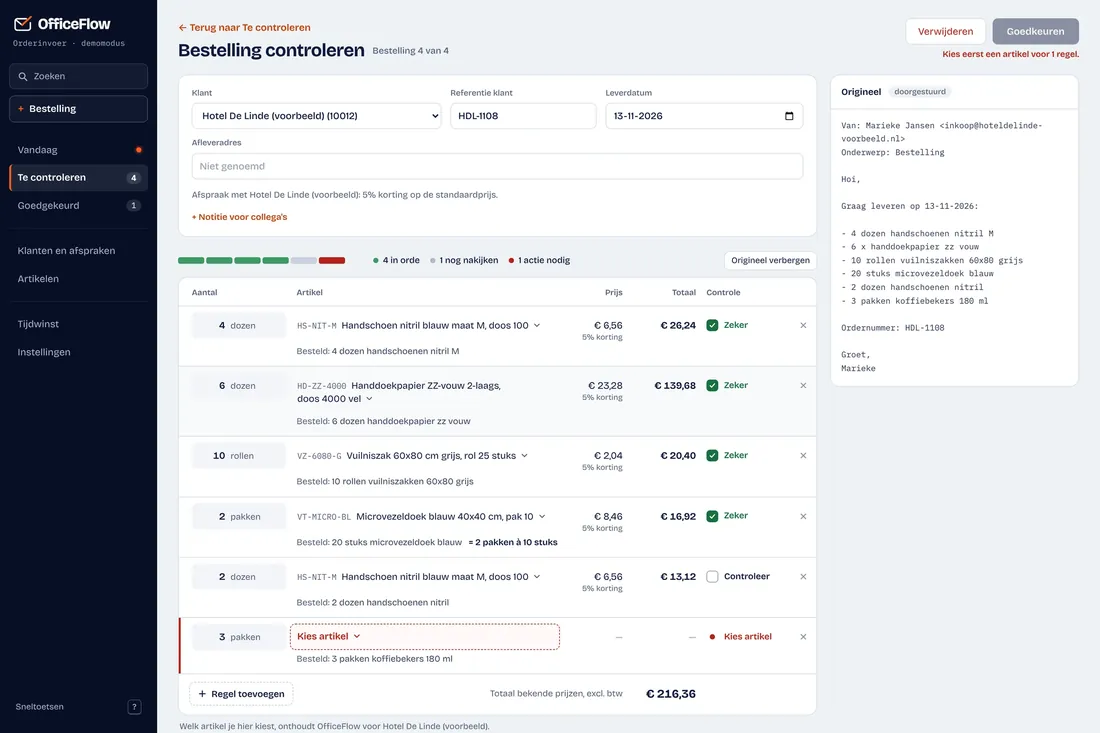
One place for all your orders.
Your customer emails, orders on their own in the customer portal, or your sales rep orders for them on site. Everything arrives in the same place, with the same checks. And you can see who hasn't ordered yet.
-
Orders from email
The order from the email or the attachment, read and prepared.
- Email, PDF, Word, Excel and photos
- Customer recognised by email address
- Every line matched to your product
- Units converted, price agreements checked
-
Customer portal
Your customer orders on their own order page. On a phone or a computer, no account needed: the link is the key.
- Their regular products at the top, with what they ordered last time
- With their prices, if you want
- Delivery date, their own order number and a note
- Only goes to your ERP after approval
-
Ordering on site
For your sales reps, on their phone.
- Pick the customer, regular products included
- With prices
- With available stock, if OfficeFlow knows it
- Arrives in To review, never approved automatically
-
Call list
Never miss an order from your regular customers.
- Who didn't order at their usual time
- Who ordered late or less than usual
- Phone number included, email ready as a draft
- No alert when the customer is on holiday
See it in action.
The 30-second spot, or the whole workflow in one minute in the real app. Both videos are in Dutch.
OfficeFlow in 30 seconds, with sound and Dutch text. The screens are the real app with sample data; the office and warehouse footage was made with AI.
OfficeFlow in one minute: from order email to approved order, in the real app with sample data. No sound, with Dutch captions on screen.
Works with your ERP.
Approved orders go straight into Exact Online, Business Central or AFAS Profit, or as a file into your own ERP. Using different software? Let us know.
-
Exact Online
The order goes straight in as a sales order, for the right customer account. Its status comes back into OfficeFlow, and stock levels too if you want.
-
Business Central
Microsoft Dynamics 365 Business Central (online). The order goes straight in as a sales order, for the right customer, with the delivery date and your units. Business Central works out the prices itself.
-
AFAS Profit
The order goes straight into AFAS. We first test the integration in a test environment of your AFAS.
-
As a file
A CSV file to import into your own ERP.
-
Other software?
Let us know which software you use.
Email us
All features at a glance.
From the order that comes in to the order in your ERP, and everything that makes your day easier.
Incoming
- Your own forwarding address
- Reading emails and CSV
- Reading PDF, Word and Excel
- Photos of a list
- WhatsApp awaiting approval
- By phone or on paper
- Customer portal
- Ordering on site
- Failed emails
- Queue during an outage
- Duplicate or addition
Review
- Recognising the customer
- Matching products
- Converting units
- Price agreements
- Stock
- The email alongside
- Quick approval
- Automatic approval
After approval
- Export as a file
- Exact Online
- Business Central
- AFAS Profit
- Order confirmation
- Packing list
- Warehouses
Your day
- Today
- Call list
- Customer card
- Search
- Time saved
- Trial report
Teamwork and security
- Working together
- Roles
- Activity log
- Recycle bin
- Two-factor authentication
- Your own backup
- Working offline
- Multiple companies
- Email alerts
- Stored in Frankfurt
You stay in control.
OfficeFlow does the groundwork. You decide what happens to an order. And your data stays yours.
Nothing goes without your approval.
OfficeFlow prepares the order. If it's unsure about a product, you choose. Only when someone on your team approves it does the order go to your ERP, unless you choose to have orders OfficeFlow is sure about approved automatically. OfficeFlow never sends anything to your customer itself.
Something wrong? You'll hear about it.
If OfficeFlow can't read an email, it's set aside with the reason. If an urgent order is left waiting or sending to your ERP fails, you get an email alert.
Your data is stored in Frankfurt.
In a database in the EU, encrypted with AES-256. Connections use HTTPS.
Separated per company.
Users only see their own company's data. The database enforces this itself.
No training on your data.
We only use your data for your OfficeFlow. The AI service doesn't train on it.
You don't connect your mailbox.
You forward order emails. OfficeFlow only sees what you forward.
For reading orders and for email we use services from the US (Anthropic and Postmark). Which services we use, where they run and how long we keep data is set out in the data processing agreement (in Dutch). You can cancel monthly.
Pricing
A fixed monthly price, with no annual contract. Choose the plan that fits your number of orders. Prices exclude VAT.
-
Entry
€99 per month
Up to 100 orders per month
-
Start
€249 per month
Up to 500 orders per month
-
Growth
€349 per month
Up to 1,000 orders per month
-
Plus
€449 per month
Up to 1,500 orders per month
-
Large
€649 per month
More than 1,500 orders per month
At 800 orders per month: Growth, €349 per month.
For comparison: retyping currently takes about 53 hours per month. That's €2,523 in wage costs, at per order.
How this is calculated
The number of orders times the minutes per order is the time retyping takes. That time times €47.60 per hour is the wage cost. The minutes per order are an assumption: set them to your own time with − and +.
€47.60 is what an hour of work cost on average in the Netherlands in 2025 in wages and employer contributions, across all sectors (source: CBS, De arbeidsmarkt in cijfers 2025, in Dutch). Your own hourly costs may be lower or higher. Reviewing takes time too. In OfficeFlow you see the measured review time per month and an estimate of the time you save.
Included in every plan
- Reading, matching and the review screen
- Learns per customer
- Integration with Exact Online, Business Central or AFAS Profit, at no extra cost
- Cancel monthly
One-off setup €300. We import your product and customer lists and set up the rules for your customers.
A demo and a trial are free right now. Setup is then free as well. Or try it yourself with 20 real orders.
More orders than your plan? If you go over your plan's number of orders in a month, you move to the next plan the month after. We'll let you know first.
Multiple locations? We'll agree on that together. Our general terms and conditions (in Dutch) apply to OfficeFlow.
FAQ
Is your question not listed? Email us at mail@officeflowcompany.com.
Do my customers need to do anything differently?
No. Your customers order the way they always do, simply by email. An Excel list, Word file or PDF as an attachment works too, as does a scanned PDF or a photo of a list.
Do I need to connect my mailbox?
No. You forward order emails to your own OfficeFlow address: by hand, or automatically with a rule in Outlook or Gmail. That way OfficeFlow only sees the emails you forward. You can also drag an order into OfficeFlow yourself.
What if OfficeFlow reads something wrong?
Nothing goes to your ERP until someone on your team has approved the order, unless you choose to have orders OfficeFlow is sure about approved automatically. OfficeFlow never sends anything to your customer itself. If OfficeFlow is unsure about a product, you'll see an empty box or red. OfficeFlow doesn't always spot a misread quantity; that's why the original email is shown alongside. Whichever product you choose, OfficeFlow remembers it for that customer.
How does OfficeFlow read an order?
With a language model (AI) that understands text, combined with your product list and what it has learned per customer. The language model extracts the details from the email. Matching to your products and remembering which product you chose is done by OfficeFlow itself.
How does OfficeFlow know who hasn't ordered yet?
For each customer you set the day and the time by which they order. If that time has passed and no order has come in, the customer appears on your call list, with the phone number from the customer card. The alert disappears when the order comes in or when you deal with it. If the customer is on holiday or you're closed yourself, there's no alert.
Which ERP or accounting software does it work with?
You export approved orders as a CSV file for your own software, or send them straight into Exact Online, Microsoft Dynamics 365 Business Central (online) or AFAS Profit. For AFAS, we set up the integration together with you and first test it in a test environment of your AFAS. Only when everything is right do orders go into your live administration. Using different software? Let us know.
Is this the same as EDI or a B2B webshop?
No. With EDI and with a webshop your customer has to change the way they order: through a link between systems, or by logging in and clicking on products. OfficeFlow works with the emails your customers already send. If a customer would rather order themselves, they can, in the customer portal: their own order page, no login needed and their regular products at the top.
What happens to our data?
We only use your data for your OfficeFlow, and only the way you want. Your data is stored in a database in Frankfurt. For reading orders and for email we use services from the US: forwarded emails are kept at Postmark for 45 days, and Anthropic generally deletes the orders it has read within 30 days and doesn't train on them. Everything is set out in the data processing agreement (in Dutch): which services we use, where they run and how long we keep data.
Can I cancel?
Yes, monthly. There's no annual contract.
What language is the app in?
Dutch. This website is in English, but the app itself, the videos and our legal documents are in Dutch.
Discover what OfficeFlow can do for your wholesale business.
Try it yourself with your own orders, or book a demo. Both are free.
Try it yourself
- Create a free trial account.
- Add your product list.
- Forward 20 real orders.
OfficeFlow then shows you what it made of them: how many customers and lines it got right, what your team had to change and how long checking took.
Create a free trial accountYou don't need to connect your ERP for this. The app is in Dutch.
Want to look around first, without an account? Open OfficeFlow with sample data
Your request has been sent.
We'll get in touch to schedule the demo.
Prefer to get acquainted first? Email mail@officeflowcompany.com